Blog

  • **Working Title:** *”Why Coulomb’s Law Is Easy to Understand but Hard to Test at Home”*

    **Working Title:** *”Why Coulomb’s Law Is Easy to Understand but Hard to Test at Home”*

    Header image source: Coulomb’s law remains tricky to test at home via Casual Physics Enjoyer – Substack via Google — cropped to 16:9 and colour-adjusted.

    Key takeaways

    • Home setups can’t generate consistent static charge or isolate it from humidity
    • Electrostatic forces are too tiny for kitchen scales to detect reliably
    • Professional experiments use vacuum chambers and interferometry for 1 part in 10⁹ precision

    Two metal balls. A ruler. A sensitive scale. That’s the shopping list for verifying Coulomb’s law—the inverse-square rule that tells you how electric charges push and pull. The equation looks like child’s play: F = k q₁q₂ / r². Double the distance, quarter the force. Done.

    Except it’s not done. Not even close.

    A physics enthusiast is trying to design a home experiment to test Coulomb’s law. They hit a wall before the first measurement. Not because the math was hard. Not because the concept was tricky. Because charge—actual, measurable, consistent charge—refused to cooperate. Rubbing a metal ball with wool or plastic generates static, sure. But how much? How consistent? How long does it last before leaking away? None of these questions have reliable answers outside a lab. And when professional experiments confirm the inverse-square relationship to 1 part in 10⁹, unpredictability isn’t just a nuisance. It’s a dealbreaker.

    This isn’t just a story about a failed DIY project. It’s a lesson in why even the most "basic" physics experiments demand precision that home setups can’t touch. And what that gap says about how science actually works.


    The Illusion of Simplicity

    Coulomb’s law looks tailor-made for a home experiment. The equation is clean. The materials seem simple: aluminum foil, metal spheres, a ruler. Historical precedent exists—Coulomb himself used a torsion balance. So why doesn’t it work at home?

    Because the devil lives in the details. Coulomb’s original experiments weren’t just clever. They were controlled. His torsion balance didn’t just measure force—it amplified it. A thin wire twisted by tiny electrostatic forces, with the angle of deflection read through a microscope. Try improvising that with a rubber band and a protractor.

    Modern experiments take precision further. Professional experiments have confirmed Coulomb’s law to within 1 part in 10⁹. It didn’t. But achieving that required extreme precision and controlled conditions. None of which are kitchen-friendly.

    At home, you’re stuck with static cling and a ruler.


    The Charge Problem: Why Your Metal Ball Betrays You

    The first hurdle is generating repeatable charges. Rubbing a metal ball with wool or plastic might create a spark, but the amount of charge transferred is anyone’s guess. Household materials—aluminum foil, copper wire, even "conductive" metal spheres—are riddled with inconsistencies. Oxidation layers, dust, surface contaminants. Humidity in the air acts like an invisible conductor, siphoning charge away before you can measure it.

    In a lab, charges are isolated. Faraday cages block external fields. Ion beams or charge division techniques let researchers dial in exact amounts of charge. At home? You’re at the mercy of whatever static you can scrape together.

    Even if you manage to charge your metal ball, keeping it charged is another battle. Air humidity above ~30% starts leaking charge away in seconds. Most homes hover around 40–60% humidity—enough to sabotage any attempt at consistency. Some DIYers try desiccants or dehumidifiers, but these introduce new variables: temperature gradients, air currents, or the desiccant itself acting as a conductor.

    Professional labs don’t just control humidity—they eliminate it. Experiments run in dry nitrogen or vacuum chambers, where charge leakage is negligible. At home, your charged balloon sticks to the wall for a few minutes, if you’re lucky.


    Measuring Tiny Forces: Why Your Kitchen Scale Is Useless

    Even if you solve the charge problem, you’re not out of the woods. The forces involved in Coulomb’s law are tiny. Two 1 nC charges separated by 1 cm exert a force of about 90 micronewtons. For context, that’s roughly the weight of a single human eyelash. Your average kitchen scale maxes out at grams, not micrograms. Improvised pendulums or torsion balances made from thread and straws might detect something, but the signal drowns in environmental noise.

    Coulomb’s torsion balance worked because it amplified the force. A tiny electrostatic push twisted a wire, and the angle of twist was read through a microscope. Try replicating that with a laser pointer and a mirror taped to a soda can. Even if you could, alignment errors and calibration drift introduce uncertainties that swamp the measurement.

    Environmental noise is another killer. Vibrations from footsteps, air currents from an open window, or the electrostatic field from a nearby charged sweater can distort results. In a lab, these variables are controlled or eliminated. At home, they’re the background radiation of daily life.


    The Inverse-Square Test: Why Distance Measurements Lie

    Here’s where things get really tricky. Coulomb’s law predicts that force should scale with 1/r². To test this, you’d plot force against distance on a log-log graph and look for a slope of -2. Sounds straightforward. It’s not.

    First, there’s the problem of probe size. Coulomb’s law assumes point charges, but your metal ball isn’t a point—it has a radius. At small separations, the distance r isn’t just the distance between the centers of the balls. It’s the distance between their surfaces. If your balls are 1 cm in radius, and you try to measure the force at 1 cm separation, you’re already violating the point-charge assumption. The inverse-square relationship breaks down.

    Then there’s alignment. If your two charged balls aren’t perfectly aligned, the force you measure isn’t F = k q₁q₂ / r²—it’s F cos(θ), where θ is the misalignment angle. A few degrees of error might seem minor, but at small distances, it’s enough to skew your results.

    Finally, there’s the resolution of your distance measurement. A ruler gives you millimeter precision. That’s fine for measuring the length of a book, but it’s useless for detecting small deviations from r⁻². Professional experiments use interferometry or piezoelectric actuators to control and measure distances with nanometer accuracy. At home, you’re stuck with whatever you can eyeball.


    The Symmetry Problem: Why Two Charges Aren’t Enough

    Coulomb didn’t just measure the force between two charges. He also verified that the force was symmetrical—that swapping the charges didn’t change the result—and that it scaled linearly with the charge on each sphere. This is critical for confirming the q₁q₂ term in the equation.

    At home, you have no way to systematically vary charge. Rubbing two objects together rarely imparts identical charges, and there’s no easy way to "halve" a charge for controlled experiments. In a lab, researchers use Faraday cups or charge division techniques to precisely control q₁ and q₂. At home, you’re limited to whatever static you can generate.

    Then there’s the problem of polarization. Nearby conductors—like a metal table or even your own body—can induce image charges, distorting the field between your test charges. In a lab, these effects are shielded or accounted for. At home, they’re just another source of error.


    What Can You Test at Home? (And Why It Still Matters)

    So is there anything you can do at home to explore Coulomb’s law? Yes—but the goal shifts from verification to demonstration.

    Qualitative observations are still possible. These experiments won’t confirm the inverse-square law, but they’ll give you a feel for how static electricity behaves.

    For something semi-quantitative, try measuring deflection angles with a smartphone camera. A charged pendulum—a metal ball on a thread—will deflect in the presence of another charge, and you can use image analysis to track the angle. It’s not precise, but it’s a start.

    The real value of these attempts isn’t in the results. It’s in the process. Struggling with Coulomb’s law at home teaches you why physics relies on controlled conditions, precision tools, and systematic error analysis. It’s a reminder that what looks simple on paper is often brutally complex in practice.


    How the Pros Do It: Precision at Any Cost

    Professional experiments don’t just confirm Coulomb’s law—they stress-test it. Professional experiments have confirmed the inverse-square relationship to 1 part in 10⁹. If the exponent in r⁻² deviated even slightly, a current would flow. It didn’t.

    To achieve this, they needed highly controlled laboratory conditions.

    Some experiments test Coulomb’s law at various scales. The precision isn’t just academic. It’s a way to probe the limits of our understanding.

    At home, you’re lucky if you can measure the force between two charges at all. In a lab, they’re measuring the absence of a force to one part in a billion.


    The Bigger Picture: Why Home Experiments Still Matter

    So why bother trying to test Coulomb’s law at home? Because the struggle is valuable.

    The tradition of "kitchen physics" runs deep. Galileo rolled balls down inclined planes. Faraday built motors from wire and magnets. These weren’t just demonstrations. They were the foundations of modern physics. The fact that Coulomb’s law resists home verification doesn’t diminish its importance. It highlights the gap between intuition and precision.

    Even failed attempts teach lessons. They force you to think about experimental design, error propagation, and the limits of measurement. They show why science relies on controlled conditions—and why those conditions are so hard to replicate outside a lab.

    And then there’s the role of simulation. While home experiments hit walls, computational tools like finite-element simulations let amateurs explore electrostatics virtually. You can’t measure Coulomb’s law with a ruler, but you can model it on your laptop. That’s not the same as hands-on experimentation, but it’s a way to engage with the physics.

    The real question is whether the gap between home and lab can ever be bridged. Or is this one experiment destined to remain a lab-only verification?

    Either way, the attempt is worth it. Because the moment you try to measure F = k q₁q₂ / r² at home is the moment you realize just how much precision hides behind that simple equation. And how much we take for granted when we call something "basic. "

  • **Working Title:**

    **Working Title:**

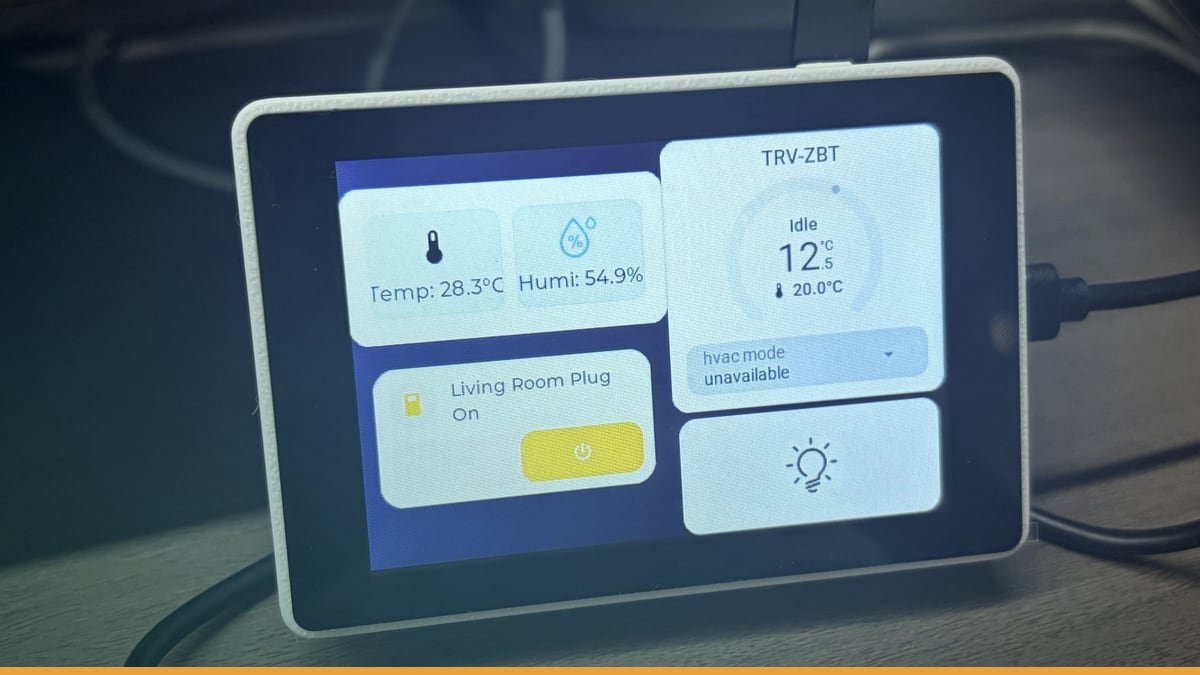
    Header image source: I wanted a small Home Assistant touchscreen, so I tried this ESP32-S3 screen – Share your Projects! – Home Assistant Community via Home Assistant Community via Google — cropped to 16:9 and colour-adjusted.

    Key takeaways

    • $15–$40 hardware boots straight into Home Assistant dashboard
    • No Android OS, no battery degradation, no lag
    • DIY firmware works on Cheap Yellow Display and Guition ESP32-S3-4848S040

    The Cheap Yellow Display and Guition ESP32-S3-4848S040 just landed firmware that boots straight into Home Assistant. No Android. No battery. No lag. Just a screen that wakes up inside your dashboard for $15–$40.

    This isn’t another hack using old tablets. It’s purpose-built hardware running purpose-built code. And it’s forcing smart home users to question why they were paying so much for similar functionality.


    The Two Paths We’ve Been Stuck On—And Why Both Suck

    Right now the smart-home wall-panel game has exactly two options: repurposed Android slabs and off-the-shelf touchscreen bricks. Neither is good.

    The Tablet Trap

    The Lenovo Tab M10 is the community’s go-to. At its price point, multiple units become expensive. And that tablet is still running a full-fat Android OS under the Home Assistant Companion kiosk. That means:

    • Lag. Background processes slowly turn your silky-smooth dashboard into a slideshow.
    • Updates. A single Android security patch can break kiosk mode, leaving you with a lock screen instead of your lights.
    • Battery rot. Even when plugged in 24/7, lithium-ion degrades. Over time, tablet batteries degrade and may need replacement.

    Worse, tablets weren’t designed for walls. They come with chunky cases, awkward viewing angles, and a form factor that screams “tech demo” instead of seamless integration.

    The Commercial Panel Fantasy

    Panels like the YC-SM08P (~$100) and YC-1011 (~$300+) solve the form-factor problem. They’re sleek, flush-mountable, and built for 24/7 duty. But:

    • Fixed specs. You get whatever screen brightness, resolution, and touch tech the manufacturer chose. Want a brighter panel? Too bad.
    • Locked layouts. Proprietary firmware means rigid menus. Swipe gestures? Custom icons? Forget it.
    • Upgrade roulette. If the vendor stops pushing updates, your $300 panel becomes a paperweight.

    And then there’s the WAF problem—the Wife Acceptance Factor. If nobody’s tapping the screen, it doesn’t matter how pretty it is.


    The DIY Escape Hatch: How This Firmware Works

    The new solution sidesteps both traps by running on dirt-cheap hardware: either the Cheap Yellow Display (ILI9341 + XPT2046 resistive touch) or the Guition ESP32-S3-4848S040 (ST7701S RGB + GT911 capacitive touch). Here’s the playbook:

    Hardware

    • Cheap Yellow Display: 2.8"–3.5", 320×240, resistive touch. Price: ~$15–$25.
    • Guition ESP32-S3-4848S040: 4", 480×480, capacitive touch. Price: ~$30–$40. Powered by an ESP32-S3 with Wi-Fi and BLE.

    Firmware Loading

    No coding. Download a pre-built binary, flash it via USB with esptool (ESP32) or Arduino IDE (Cheap Yellow Display). Five minutes later, the device boots straight into your Home Assistant dashboard.

    Why It Beats Tablets

    • No OS tax. The firmware is optimised for Home Assistant. No Android, no background tasks, no lag.
    • Lower power. Both devices sip 5V/1A, making them perfect for PoE or wall adapters.
    • Dedicated hardware. No battery rot, no accidental app launches, no update surprises.

    Hardware Face-Off: Cheap Yellow Display vs. Guition ESP32-S3-4848S040

    Not all DIY screens are equal. Here’s the breakdown:

    Cheap Yellow Display

    • Screen: ILI9341, 320×240, resistive touch (XPT2046).
    • Pros:
    • Dirt cheap. ~$15–$25 lets you deploy one in every room without guilt.
    • Dead simple. Power and USB are all you need.
    • Tiny. Fits standard 3D-printed cases, ideal for flush mounting.
    • Cons:
    • Postage-stamp resolution. 320×240 feels cramped for anything beyond basic buttons.
    • Resistive touch. Less responsive, requires more pressure.
    • Screen real estate. Hard to fit more than 4–6 buttons per page.

    Guition ESP32-S3-4848S040

    • Screen: ST7701S, 480×480, capacitive touch (GT911).
    • Pros:
    • Sharper. 480×480 is usable for text and icons.
    • Capacitive touch. Smoother, more responsive taps.
    • ESP32-S3. Wi-Fi and BLE let it run standalone for simple tasks.
    • Cons:
    • Pricier. ~$30–$40, though still a fraction of a tablet.
    • Soldering. Some setups need manual power and touch wiring.

    The Wildcard: The 4" Guition Alternative

    A smaller, cheaper Guition device (~$20) exists, but it needs manual coding to work with Home Assistant. The ESP32-S3-4848S040, by contrast, works out of the box with the new firmware.


    What You Can Actually Control

    This isn’t a full Home Assistant dashboard. You won’t be streaming camera feeds or monitoring complex data on a small screen. But for quick, room-specific controls, it’s surprisingly capable.

    Capabilities

    • Touch buttons for any Home Assistant entity—lights, switches, climate, media players.
    • Multi-page layouts with swipe gestures between screens.
    • Custom icons (though resolution limits creativity).
    • Flush mounting (the Cheap Yellow Display’s size makes this easy).

    Ideal Use Cases

    1. Single-room dashboards. Bedside control for lights, AC, and blinds. Kitchen control for appliances and timers.
    2. **Multi-device setups. One screen per floor, avoiding the single-device bottleneck.
    3. **Hidden panels. Flush-mounted in walls or cabinets.

    Limitations

    • No complex automations. Forget scenes with multiple conditions.
    • **No camera feeds. The hardware has limitations for complex tasks.
    • No voice control. If your household lives by “Hey Google,” these panels won’t replace it.

    Setup: How Hard Is It Really?

    The process is simpler than you’d think—but it’s not entirely plug-and-play.

    Firmware Flashing

    1. Tools: USB cable, esptool (ESP32) or Arduino IDE (Cheap Yellow Display).
    2. Steps:
    • Download the pre-built firmware binary for your device.
    • Connect via USB.
    • Run a single command (e.g., esptool.py --chip esp32s3 --port /dev/ttyUSB0 write_flash 0x0 firmware.bin).
    • Wait for the flashing process to complete.

    No coding. No compiling. Just one command.

    Home Assistant Integration

    Once flashed, the device appears as a native entity in Home Assistant. Configure it via the UI—no YAML, no extra hubs. The firmware handles the rest, talking to Home Assistant over Wi-Fi.

    Power and Mounting

    • Power: Both devices run on USB power. Options:
    • Wall adapters.
    • PoE splitters (for cable-free setups).
    • USB ports on smart switches or hubs.
    • Mounting:
    • Cheap Yellow Display: Can be mounted in various enclosures.
    • Guition ESP32-S3-4848S040: Can be mounted for installation.

    Cost Breakdown: DIY vs. Commercial vs. Repurposed

    |————————-|—————|————–|—————|——————–|

    The Takeaway

    • Cheap Yellow Display: The budget king. At $15–$25, you can carpet every room without blinking.
    • Guition ESP32-S3-4848S040: The sweet spot. $30–$40 buys a sharper screen, capacitive touch, and Wi-Fi/BLE.
    • Tablets: More expensive than DIY options.
    • Commercial panels: Overpriced for what they deliver. The YC-1011 is powerful but costs as much as a used laptop.

    The Catch: Why This Isn’t for Everyone

    This solution is a game-changer—but it’s not a universal fix. Here’s what might trip you up:

    Screen Size Limits

    If you’re used to larger tablets displaying complex information, these screens will feel limited. They’re single-purpose tools, not dashboard replacements.

    Touch Responsiveness

    • Cheap Yellow Display: Resistive touch feels primitive. It works, but it’s not as smooth as a tablet or the Guition’s capacitive screen.
    • Guition ESP32-S3-4848S040: Capacitive touch is better, but it’s still not as responsive as a modern smartphone.

    WAF (Wife Acceptance Factor)

    If your household ignores touch panels in favour of voice commands or physical switches, these devices won’t change that. They’re supplementary, not primary interfaces.

    DIY Stigma

    Flashing firmware, wiring power, and debugging Wi-Fi aren’t for everyone. If you break into a cold sweat at the sight of a soldering iron, this might not be your scene—though the process is simpler than most smart-home projects.


    Future-Proofing: Where Does This Go Next?

    The firmware is open-source, so the community could take it in some interesting directions:

    Firmware Updates

    • MQTT support: Let the panels run standalone without Home Assistant, turning them into local control hubs.
    • LVGL integration: Add richer UI elements like sliders, graphs, and animations.
    • BLE/Wi-Fi direct control: Let the panels talk directly to smart devices (switches, sensors) without Home Assistant in the loop.

    Hardware Trends

    The ESP32-S3’s dual-core processor and Wi-Fi/BLE open up possibilities: Say voice commands to the panel itself, no cloud required.

    • Offline operation: Store basic automations locally, so the panel keeps working even if Home Assistant crashes.
    • Multi-protocol support: Add Zigbee or Z-Wave radios for direct device pairing.

    Competition


    Who Should Try This—and Who Should Walk Away

    Try This If…

    • You want sub-$50 control panels for specific rooms (bedroom, kitchen, garage).
    • You hate OS bloat and battery rot—dedicated hardware wins every time.
    • You’re comfortable with DIY (flashing firmware, basic wiring).
    • You need multiple panels and want to avoid high costs.

    Stick to Tablets/Commercial Panels If…

    • You need large screens for complex dashboards.
    • Your household won’t touch panels (voice assistants rule).
    • You lack time for setup and want plug-and-play.
    • You need advanced features on your control panels.

    The Big Question: Will This Kill the Tablet Market?

    Unlikely—at least not yet. Tablets still have a place for users who want comprehensive dashboards. But for room-specific controls, this DIY approach is a no-brainer.

    The real disruption here isn’t the hardware. It’s the mindset shift. We’ve been trained to think smart-home control panels need to be expensive, power-hungry, or repurposed from other devices. This firmware proves that’s nonsense.

    The question now: **** If the DIY community keeps pushing, we might see more affordable ready-made panels. And that’s when the real fun begins.


  • The Home Computer Generation

    The Home Computer Generation

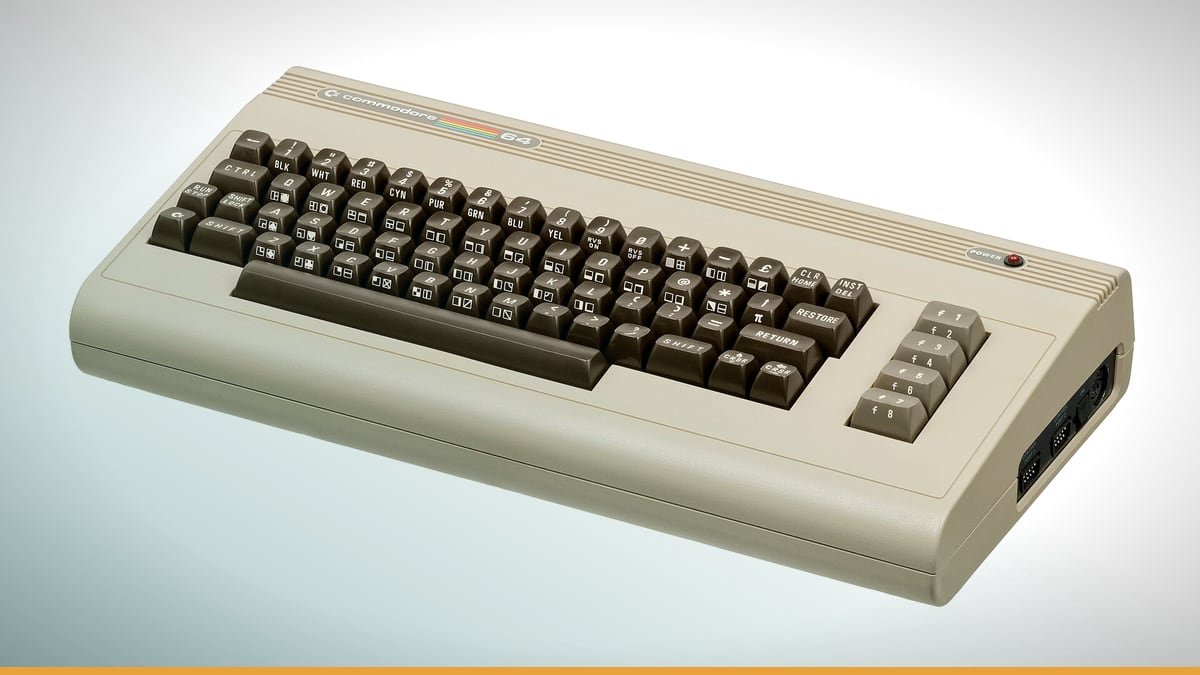
    Header image: Commodore-64-Computer-FL by Evan-Amos, Public domain, via Wikimedia Commons — cropped to 16:9 and colour-adjusted.

    Key takeaways

    • Home computer users had to understand machines to make them work
    • Modern devices seal away the inner workings
    • Friction and failure built deep technical literacy

    The home computer is dead. Not the idea—computers in homes are everywhere now—but the kind of machine that defined an entire cohort. The ones with manuals thicker than a phone book, floppy drives that jammed if you so much as blinked, and BIOS screens that looked like ancient scripture. These weren’t appliances. They were puzzles. And when they vanished in the early 1990s, they took something irreplaceable with them: a generation’s worth of hands-on, break-it-to-learn-it computer literacy.

    The author calls this cohort the "home computer generation"—a group straddling Gen X and Millennials. They weren’t just the first to grow up with computers in their houses. They were the last who had to understand how those computers worked just to use them. That difference—between using technology and wrestling with it—is the divide that shaped modern computing.


    Who Were These People?

    They weren’t defined by birth years. They were defined by experience. The home computer generation had their formative years when machines like home computers turned bedrooms and basements into labs. These weren’t consumer electronics. They were projects. You didn’t just turn them on. You fought with them. You fixed them. And if you were lucky, you got them to do what you wanted before bedtime.

    Before them, programming was a job. Mainframes and terminals were for engineers, scientists, and data-entry clerks. Their parents might have used computers at work, but only through punch cards or dumb terminals—tools that hid the machine itself. The home computer flipped that. Suddenly, the computer was yours. And if it didn’t work, the only person to blame was the one staring at the screen.

    After them? Millennials. The first generation to grow up with computers in their homes—but not the same kind. By the early 1990s, the home computer market segment had vanished. IBM compatibles became more affordable. Fourth-generation video game consoles offered improved graphics. The idea of a "home computer" as a distinct category faded into history. Millennials inherited a world where computers were just another consumer product—polished, sealed, and designed to "just work. " And that, as it turned out, was the problem.


    The Forced Education: How Broken Games Built Literacy

    The home computer generation didn’t choose to learn how computers worked. They had to. There was no IT department to call when your game wouldn’t load. No customer support line to walk you through driver conflicts. If your software crashed, the only person who could fix it was you.

    Memory management? On a Commodore 64, you had 64KB of RAM—less than a single JPEG today. If your game needed more, you got creative. You loaded parts of the program in chunks, swapped them out, and hoped the whole thing didn’t collapse. Driver conflicts? Modern OSes handle this automatically. On a home computer? You spent hours tweaking CONFIG.SYS and AUTOEXEC.BAT, adjusting IRQ settings, crossing your fingers that your sound card and graphics card wouldn’t start screaming at each other.

    And the software. Cracked games often needed hex edits to bypass copy protection. Modems required manual initialization strings. Hard drives had to be low-level formatted before use. Every step was a lesson in how the machine actually worked. You couldn’t google the answer. You had to figure it out.

    Datagubbe puts it bluntly: "The home computer generation had little choice but to gradually absorb computer literacy during years of trying to get their games and programs to run. " That’s the key. This wasn’t education by design. It was education by necessity. And it produced a generation that didn’t just use computers—they understood them.


    The Death of the Home Computer: What Really Changed?

    By the early 1990s, the home computer was gone. Not because people stopped buying computers, but because the category ceased to exist. IBM-compatible PCs became affordable enough to replace them. Consoles like the SNES and Sega Genesis offered better graphics and simpler experiences. Why wrestle with a command line when you could pop in a cartridge and play Sonic the Hedgehog without a single error message?

    The software market played its part. Writing one’s own software programs was more common during the home computer era. The incentive to write one’s own software programs diminished. Why bother writing your own programs when commercial alternatives existed? The incentive to tinker vanished.

    And then there was the criticism. Some dismissed home computers as a fad. There was a general feeling that there was really no practical purpose for a computer in the home. Why would anyone need a machine that required hours of configuration just to balance a checkbook? Better to wait for something that worked out of the box.

    They got their wish. And in the process, they lost something irreplaceable.


    The Professionalization of IT: From Survival Skill to Career Path

    For the home computer generation, computer literacy wasn’t a career path. It was a survival skill. You learned how computers worked because if you didn’t, they wouldn’t work for you. There was no alternative.

    Today? IT is just another job. Datagubbe notes that succeeding generations "consider a job in IT as just another career path among others. " That’s not a knock on modern IT professionals—they’re often highly trained and skilled. But the mentality is different. For the home computer generation, IT wasn’t a profession. It was a way of thinking.

    The difference is subtle but profound. When IT is a career, you solve problems within the constraints of your job description. When IT is a skill, you solve problems because the problem exists, and the only tool you have is your own ingenuity. The home computer generation didn’t wait for someone else to fix their machines. They fixed them themselves.

    That mindset didn’t just disappear. It was designed out of modern computing. Today’s devices are sealed. App stores are walled gardens. Customer support is outsourced. The message is clear: You don’t need to understand this. Just use it.

    And so, a generation that could debug a memory leak in their sleep has been replaced by one that can order groceries with a voice command—but couldn’t tell you how the voice command actually works.


    The Millennial Paradox: More Computers, Less Literacy?

    Millennials were the first generation to grow up with computers in their households. By the numbers, they should be the most computer-literate cohort in history. And yet.

    Millennials are described as a less patient and slightly more entitled generation than the ones preceding it. That’s not a moral failing. It’s a logical outcome. If technology is designed to "just work," why would you tolerate anything less? The home computer generation expected their machines to break. Millennials expect them to work flawlessly—and when they don’t, the solution is to replace them, not repair them.

    There’s an irony here. The home computer generation had less access to technology, but they understood it more. Millennials had more access, but their literacy was shallower. They knew how to use computers, but not how to control them.

    That’s not a criticism of Millennials. It’s a criticism of the systems that raised them. When technology is designed to be opaque, literacy becomes a niche skill. And when literacy becomes a niche skill, the people who do understand how things work become gatekeepers—not tinkerers.


    The Lost Mentality: Why It Still Matters

    The home computer generation didn’t just learn how to use computers. They developed a mentality—one rooted in curiosity, problem-solving, and ownership. That mentality looked like this:

    • Willingness to break things. If your game crashed, you didn’t throw the computer out the window. You poked at it until it worked again.
    • Comfort with ambiguity. Why did your sound card work yesterday but not today? Who knows. But you’d figure it out.
    • Seeing software as malleable. Programs weren’t black boxes. They were things you could modify, tweak, and improve.

    That mentality is gone now. Today’s devices are designed to prevent you from breaking them. IT is outsourced to professionals. User agency is minimized. And the result? A generation that can use technology but can’t shape it.

    The author fears this mentality is lost. And they’re right to be afraid. Because when you lose the ability to understand your tools, you lose the ability to control them. And when you lose control, you become a consumer—not a creator.


    Could It Happen Again? The Limits of Modern Tinkering

    Is it possible to recreate the conditions that forged the home computer generation? Could another cohort develop the same hands-on, problem-solving mindset?

    No. The barriers are too high.

    • Sealed hardware. Smartphones and tablets are designed to be opened only by professionals. Even laptops are increasingly glued shut.
    • Walled gardens. App stores and DRM prevent users from modifying software. Want to tweak an app? Too bad. It’s locked down.
    • Professionalized support. IT departments and customer service lines mean users never have to solve problems themselves.

    There are exceptions. Raspberry Pi and Arduino have brought back some of the old tinkering spirit. Retro computing communities keep the flame alive. But these are niche interests, not mainstream movements. The home computer generation wasn’t a niche. It was the default experience for an entire cohort.

    The question isn’t whether tinkering is still possible. It’s whether it’s still necessary. And the answer is no. Modern technology is designed to work without you understanding it. And that’s a feature, not a bug.


    The Home Computer Generation’s Legacy: What’s Left?

    Many of them now work in tech—carrying forward their hands-on ethos. They’re the ones who still compile their own kernels, who mod their hardware, who see software as something to be explored, not just consumed.

    Their influence lingers in open-source software, in modding communities, in the hardware hackers who still refuse to accept sealed devices. But their mindset? That’s fading. The generation that grew up breaking things now builds the systems that prevent others from doing the same.

    There’s an irony here. The people who learned computers by necessity now design systems that eliminate the need to learn. They’ve made technology more accessible, more reliable, and more user-friendly. But in doing so, they’ve also made it less understandable.

    The lesson isn’t that modern technology is worse. It’s that literacy isn’t just about access. It’s about friction. It’s about struggle. It’s about the freedom to fail—and the knowledge that comes from picking up the pieces.


    The Value of a Broken Computer

    The home computer generation learned by necessity. They had no choice but to understand how their machines worked, because if they didn’t, nothing would work at all. That’s not a skill you can teach in a classroom. It’s not something you can learn from a YouTube tutorial. It’s something you absorb through years of frustration, experimentation, and—eventually—mastery.

    As technology becomes more polished and less accessible, we risk losing that skill. Not the ability to use technology, but the ability to shape it. And that’s a loss we can’t afford.

    The next generation of tinkerers might emerge. But they’ll have to fight harder for the right to break things. And in a world designed to prevent breaking, that’s a fight they might not win. What happens when the last person who remembers how to fix a broken machine is gone?


  • **Working Title:** *Orger Review: Can This iOS App Finally Deliver Full Org-Mode Power on Mobile?*

    **Working Title:** *Orger Review: Can This iOS App Finally Deliver Full Org-Mode Power on Mobile?*

    Header image source: What is Your Working Title? | Redefining Careers & Work in a Changing World — My Working Title via My Working Title via Google — cropped to 16:9 and colour-adjusted.

    Key takeaways

    • Orger syncs org-mode tasks with Apple Calendar and Reminders
    • No agenda view or advanced org-mode features like Babel
    • Best for task-focused users in Apple’s ecosystem, not power users

    No. Orger isn’t the app that finally brings full org-mode power to iOS. But if you’ve been squinting at beorg’s agenda views or cursing Orgro’s note-taking half-measures, Orger’s tight Apple Calendar and Reminders sync might just make it the least bad option for task-driven org-mode users on iPhone.


    The Problem: Why Org-Mode on iOS Has Always Been a Half-Baked Mess

    Org-mode is a productivity Swiss Army knife. Tasks, notes, agendas, code blocks — all living in a single plain-text file. On desktop, Emacs turns that file into a workflow engine. On iOS? You’re stuck with apps that solve one tiny slice of the puzzle, none of which come close to Emacs’ flexibility.

    The existing options are a patchwork. beorg does agenda views and task editing, which is fine if you’re GTD-curious. Orgro was built for reading org-mode notes in meetings, not for managing tasks or syncing with anything else. Plain Org gives you quick file access but abandons you at Apple’s ecosystem door. None of these apps even pretend to handle org-mode’s full feature set. None bridge the gap between org-mode files and Apple’s built-in apps like Calendar and Reminders.

    Orger’s pitch is different. It promises to unify org-mode files, Calendar, and Reminders in one app. That’s a bold claim, especially given iOS’s sandboxing. But if it works, it could solve one of the biggest pain points for org-mode users on mobile: the constant app-switching to manage tasks and schedules.


    Orger’s Technical Approach: How It Tries to Square the Circle

    Orger’s core selling point is its integration with Apple’s native apps. Unlike beorg or Orgro, which operate in their own little bubbles, Orger syncs with Calendar and Reminders. Your org-mode tasks can appear alongside your Apple-native events and to-dos, reducing the need to jump between apps. This is smart. Apple’s ecosystem is sticky. Users who rely on Reminders or Calendar aren’t switching to a standalone org-mode app unless it offers something compelling.

    The app also claims to preserve org-mode structure and check for external changes when saving edits. That’s critical for users who edit their org-mode files on multiple devices. If Orger truly maintains the integrity of org-mode files — nested lists, tags, properties — it could be viable for more than just task management. But the App Store listing doesn’t specify how deep this support goes. Drawers? Clocking? Babel code blocks? Probably not.

    At just 7.7 MB, Orger is lightweight. That suggests it’s not trying to replicate Emacs’ extensibility. Trade-off: fewer features, but faster performance and lower battery drain. The 4+ age rating implies nothing controversial, but it also doesn’t hint at advanced functionality. Compare this to beorg, which advertises agenda views and task editing, or Orgro, which was built for note-taking in meetings. Orger’s focus on planning and sync with Apple apps sets it apart, but it also means it’s not trying to be a full org-mode replacement.


    What Works: Where Orger Actually Delivers

    Orger’s biggest strength is its seamless integration with Apple’s ecosystem. If you’re already using Reminders or Calendar, Orger could reduce friction by bringing org-mode tasks into those apps. The App Store listing doesn’t detail how this sync works — one-way or bidirectional, conflict resolution — but if it’s reliable, it could make Orger the go-to app for org-mode users who live in Apple’s world.

    Another win: Orger doesn’t require Emacs. Org-mode’s philosophy has always been about avoiding tool lock-in, and Orger aligns with that. It lets users work with org-mode files without needing Emacs. The fact that it preserves org-mode structure is promising. If it handles nested lists, tags, and properties well, it could appeal to users who want more than just a task manager.

    For power users, Orger’s potential lies in bridging the gap between org-mode and Apple’s ecosystem. If you use org-mode for tasks but rely on Calendar for scheduling, Orger could streamline your workflow by keeping everything in sync. It’s not a full org-mode replacement, but it’s a step closer to making org-mode usable on iOS without constant context-switching.


    The Limits: Where Orger (and iOS) Still Fail

    Orger’s biggest limitation is iOS itself. The platform’s sandboxing means apps can’t freely access the file system. That’s a dealbreaker for org-mode’s "single-file-for-everything" workflow. Orger doesn’t mention direct file access in iCloud Drive or Dropbox, which means workarounds for editing org-mode files stored outside the app. This is a common issue for iOS org-mode apps, but it’s still frustrating.

    Another major gap: no agenda view. Beorg’s biggest selling point is its agenda feature, critical for GTD users who rely on org-mode’s scheduling. Orger doesn’t advertise an agenda view, which means it’s not viable for users who need to see tasks in a timeline. Significant limitation, especially for users who depend on org-mode’s clocking and scheduling.

    Orger also doesn’t mention advanced org-mode features like Babel, clocking, or custom agenda queries. These are part of what makes org-mode powerful on desktop. Their absence means Orger isn’t a true Emacs replacement. The app’s focus on Calendar and Reminders suggests it’s targeting task management, not the full org-mode experience.

    Finally, Orger’s security model is unclear. The App Store listing doesn’t mention encryption. Concern for users who store sensitive data in org-mode files. If you’re using org-mode for work or personal projects requiring confidentiality, Orger’s lack of transparency is a red flag.


    Who Is Orger For? Matching the App to Real Users

    Orger isn’t for everyone, but it could fit specific use cases:

    • Task-focused users: If you only need org-mode for to-dos and want them synced with Apple Reminders, Orger might suffice. Integration with Reminders means managing tasks without leaving Apple’s ecosystem. Big win for users who rely on Siri or other Apple-native tools.
    • Lightweight planners: Users who want a simple org-mode + Calendar combo may prefer Orger over beorg’s agenda focus. If you don’t need advanced scheduling, Orger’s streamlined approach could be better.
    • Emacs refugees: If Orgro or Plain Org felt too limited, Orger’s broader feature set might appeal. Its integration with Apple apps could make it more practical for users who want to stick with org-mode but need better mobile support.

    Orger is not for power users who need Babel, clocking, or custom agenda views. If you rely on org-mode’s advanced features, Orger will disappoint. Similarly, if you need direct file access or encryption, Orger isn’t the right choice. For these users, a remote Emacs session or a secondary device might still be the best option.


    The Competitive Landscape: Orger vs. the Rest

    Orger enters a crowded field of iOS org-mode apps, each with strengths and weaknesses. Here’s how it stacks up:

    | App | Strengths | Weaknesses | Best For | |————–|————————————|————————————-|—————————| | Orger | Calendar/Reminders integration | No agenda view, limited file access | Task + schedule sync | | beorg | Agenda view, task editing | Less focus on file management | GTD users | | Orgro | Simple note-taking | No task management | Meeting notes | | Plain Org| Quick file access | No Apple app integration | On-the-go file edits |

    Orger’s biggest advantage is its integration with Apple’s ecosystem. If you’re already using Calendar and Reminders, Orger could reduce the friction of managing org-mode tasks on iOS. But its lack of an agenda view and limited file access mean it’s not a full replacement for beorg or Plain Org.

    Beorg is better for users who need an agenda view or advanced task management. Its focus on GTD workflows makes it strong for productivity enthusiasts. Orgro is best for users who only need to view org-mode notes during meetings. Plain Org is the simplest option for quick access to org-mode files without extras.

    Orger’s niche is clear: it’s for users who want org-mode tasks synced with Apple’s ecosystem. If that’s your priority, Orger is the best option today. But if you need more than task management, you’ll need to supplement it with another app — or accept that iOS isn’t the right platform for full org-mode power.


    The Bigger Picture: Why Org-Mode on Mobile Is Still a Compromise

    Org-mode on mobile has always been a compromise, and Orger doesn’t change that. The fundamental issue is iOS’s sandboxing, which prevents apps from freely accessing the file system. This makes it difficult to replicate org-mode’s "single-file-for-everything" workflow. Apps like Orger, beorg, and Orgro each solve a small piece of the puzzle, but none can match Emacs’ flexibility.

    Org-mode’s complexity is another hurdle. The format supports tasks, notes, code blocks, agendas — all in one file. That’s powerful on desktop but difficult to replicate in a mobile app. Orger’s focus on task management and sync with Apple apps is practical, but it means sacrificing org-mode’s advanced features.

    The real advantage of desktop org-mode is Emacs’ extensibility. Emacs lets users customize workflows with scripts, plugins, and custom agenda queries — something no iOS app can match. Orger’s lightweight approach means it’s not trying to replicate Emacs, but it also means it’s not a true org-mode replacement.


    Verdict: Is Orger the Best Org-Mode App for iOS?

    Orger isn’t the app that finally brings full org-mode power to iOS. But it’s the best option for users who want org-mode tasks synced with Apple’s ecosystem. If you rely on Calendar and Reminders, Orger could reduce the friction of managing org-mode tasks on mobile. But if you need an agenda view, advanced task management, or direct file access, you’ll still need to look elsewhere — or accept that iOS isn’t the right platform for full org-mode power.

    The ideal Orger user:

    • Uses org-mode primarily for tasks.
    • Relies on Apple’s Calendar and Reminders.
    • Doesn’t need advanced org-mode features like Babel or clocking.

    For everyone else, Orger is a step in the right direction, but it’s not the solution. Beorg remains the best choice for GTD users, while Plain Org is the simplest option for quick file access. Orger’s integration with Apple’s ecosystem is welcome, but it’s not enough to overcome iOS’s limitations.


    What’s Next? The Future of Org-Mode on iOS

    Orger’s release raises a question: could it evolve into a more comprehensive org-mode app? Adding an agenda view would be a major step, but it would likely require a significant rewrite. Given Orger’s focus on planning and sync with Apple apps, an agenda feature seems unlikely — at least for now.

    The bigger issue is iOS itself. Apple has no incentive to prioritize .org files, which means org-mode users will continue to rely on third-party apps. The real solution might be a hybrid approach: use Orger or beorg for tasks and a separate editor like Plain Org for file management. This isn’t ideal, but it’s the best option until someone builds an iOS app that can truly replicate Emacs’ org-mode power.

    For now, Orger is a solid choice for task-focused users who want to stay in Apple’s ecosystem. But for power users, the dream of full org-mode on iOS remains just that — a dream. The real question is whether anyone will ever build an app that doesn’t force org-mode users to compromise. Until then, we’re stuck with half-measures.


  • Vibecade – A home for vibe-coded games

    Vibecade – A home for vibe-coded games

    Header image source: Made a trailer for my 100% vibe coded game! via Reddit via Google — cropped to 16:9 and colour-adjusted.

    Key takeaways

    • Vibecade hosts AI-generated indie games using natural language prompts
    • Claude Code can scaffold entire games from single prompts in minutes
    • Vibe coding lowers barriers but risks homogenization and skill erosion

    Leo just pocketed $25,000 for a game he built in 15 days. Not 15 days of wrestling with Unity or debugging C#. Fifteen days of talking to an AI. No engine tutorials. No syntax errors. Just prompts fed into Claude Code, and out came a Three.js game polished enough to win Vibejam 2026. This isn’t a tech demo. It’s not a prototype gathering dust in some dev’s portfolio. This is a finished product—one that earned real money on Vibecode.game, a platform for vibe-coded games.

    This isn’t just another no-code gimmick. It’s a fundamental shift in how games get made. And Vibecade isn’t just another indie storefront. It’s the first proof that natural language can replace traditional coding as the primary tool for game creation. That’s not incremental. That’s revolutionary.


    What Is Vibe Coding? The Technical Breakdown

    Vibe coding means creating games using natural language prompts with AI tools—without writing a single line of traditional code. You describe what you want—mechanics, aesthetics, systems—and the AI generates functional code in real time. He prompted Claude Code, and the AI handled the rest.

    This isn’t drag-and-drop visual scripting like Unity’s Bolt or Unreal Blueprints. Those still require you to assemble logic nodes, understand flow control, and debug visual graphs. Vibe coding doesn’t even ask you to do that. You don’t need to know what a coroutine is. You just need to describe what you want to happen.

    The core tool here is Claude Code, an AI assistant trained on vast amounts of code and documentation. It integrates with frameworks like Three.js, the Playdate SDK, and even Roblox’s abstraction layers. But it’s not just about generating snippets. Claude Code can scaffold entire projects from a single prompt. Leo’s winning game started with a prompt describing a physics-based puzzle platformer. From there, he iterated via follow-up prompts to refine gameplay mechanics and add features.

    This workflow is a radical departure from traditional development. No project setup. No build pipelines. No digging through Stack Overflow for syntax errors. Just pure, iterative design. But—and this is crucial—it’s not magic. The development process included debugging. AI-generated code often needs refinement for performance, edge cases, or complex logic.

    The key distinction between vibe coding and no-code/low-code tools is agency. With no-code, you’re assembling pre-built components within the constraints of a visual interface. With vibe coding, you’re describing outcomes, and the AI generates bespoke code tailored to your vision. It’s closer to pair programming with an infinitely patient senior developer who never sleeps.


    The $25,000 Case Study: How Leo Built a Game in 15 Days

    Leo’s winning game is a Three.js project created entirely through Claude Code. His Medium post documenting the process reveals a timeline that should make traditional developers nervous:

    • Day 1–3: Ideation and core mechanics. Leo prompted Claude Code to generate the game’s foundation. The AI produced a functional prototype in minutes. He then iterated on the feel through follow-up prompts. By the end of Day 3, he had a playable core loop.
    • Day 4–7: Level design. Instead of manually placing platforms, Leo described the levels in prompts. Claude Code generated the level layouts, which Leo then tweaked in a text editor.
    • Day 8–12: Debugging. Here’s where the AI’s limitations surfaced. The generated code had issues with collision detection and physics edge cases. Leo spent these days refining the implementation by adjusting prompts to guide Claude Code toward better solutions.
    • Day 13–15: Polish. Leo added art and audio assets using prompts. The game was submitted to Vibejam.

    The most striking part of Leo’s process isn’t the speed—it’s the complete absence of traditional coding. He described what he wanted, and the AI handled the implementation. That’s not just a workflow improvement. It’s a paradigm shift.

    But let’s be clear: Leo’s game wasn’t a AAA blockbuster. It was a polished, fun indie game with a clear vision. The $25,000 prize proves that vibe-coded games can compete in quality, but it also raises uncomfortable questions. How much of Leo’s success was due to his design skills versus the AI’s capabilities? Would a less experienced developer have produced something as cohesive? And crucially, what happens when thousands of creators flood Vibecade with AI-generated games?


    Vibecade’s Role: Marketplace, Community, or Gateway Drug?

    Vibecade isn’t just hosting Leo’s game. It’s positioning itself as the central hub for vibe-coded games. The platform, available at vibecode.game, hosts vibe-coded games and developer profiles. Here’s what it offers:

    • Discovery: Users can browse games tagged by the vibe coding tools used to create them—Claude Code, Roblox abstractions, Playdate SDK, etc. This is a smart move. It turns the AI tools into a selling point, not just a behind-the-scenes assistant.
    • Game Jams: Vibejam 2026 is a competition where Leo won $25,000. Vibecade hosts regular jams with cash prizes, incentivizing creators to experiment with vibe coding.
    • Developer Profiles: Creators can showcase their prompt engineering skills, share workflows, and build a following. This mirrors platforms like itch.io but with a focus on AI-assisted development.
    • AI Tool Integrations: Vibecade isn’t just a storefront. It’s tightly integrated with Claude Code and other AI tools, offering tutorials, prompt templates, and even in-browser testing for generated code.

    But Vibecade isn’t without gaps. The brief doesn’t specify how monetization works. Does Vibecade take a cut of sales? Is it subscription-based? Are there premium features for developers? There’s also no data on user growth or retention. How many games are uploaded daily? How many developers are active? Without these details, it’s hard to gauge whether Vibecade is a niche experiment or the next big indie platform.

    Compare Vibecade to itch.io, the current king of indie game marketplaces. Itch.io is tool-agnostic—it doesn’t care if you used Unity, Godot, or a custom engine. Vibecade, by contrast, is laser-focused on AI-assisted games. That’s both its strength and its risk. Strength, because it creates a curated space for vibe-coded games. Risk, because it’s betting big on a single workflow that may or may not scale.

    Then there’s Roblox. The brief mentions that Roblox’s abstraction layers are vibe-coding-friendly, but Roblox’s economy is dominated by studios, not solo creators. Vibecade is targeting the opposite end of the spectrum: individual developers who want to ship games without a team. That’s a smart niche, but it’s also a crowded one. Will Vibecade remain a boutique platform, or can it grow into something bigger?


    The Playdate Experiment: Vibe Coding on Hardware

    Vibe coding isn’t limited to web or PC games. A developer named Math Professor created a Playdate game using vibe coding techniques, as documented in a Playdate Dev Forum thread. This is fascinating because the Playdate is a constrained, hardware-specific platform. It runs on a custom Lua-based SDK, has limited memory, and uses a crank for input. If vibe coding can work here, it can work anywhere.

    The developer described their process:

    1. Prompting for Mechanics: They started with simple prompts. Claude Code generated Lua code that worked, but it needed manual tweaks to handle edge cases like crank sensitivity and screen wrapping.
    2. Debugging Hardware Constraints: The AI struggled with Playdate’s memory limits. Prompts to add particle effects generated code that ran too slowly. The developer had to refine the prompts to be more specific.
    3. Final Polish: The game was playable but required manual optimizations for performance. The developer noted that vibe coding got them 80% of the way there, but the last 20% required traditional debugging.

    This case study highlights both the promise and the limitations of vibe coding. It’s viable for hardware-specific development, but it’s not a silver bullet. You still need domain knowledge—understanding memory constraints, input systems, and performance bottlenecks—to guide the AI effectively. Vibe coding lowers the barrier to entry, but it doesn’t eliminate the need for expertise.

    That said, the Playdate experiment is a glimpse into the future. If vibe coding can work on a niche handheld, it can work on consoles, mobile devices, and even VR. The question is whether platforms like Vibecade will expand to support these use cases—or whether they’ll remain focused on web-based games.


    The Dark Side of Vibe Coding: Homogenization and Skill Erosion

    Vibe coding isn’t all sunshine and $25,000 prizes. It comes with real risks—risks that could shape the future of indie game development.

    Risk 1: Derivative Games

    AI tools like Claude Code default to "safe" implementations. The AI doesn’t invent new design paradigms. It remixes what it’s seen before. This isn’t a flaw in the tool—it’s a limitation of the training data. But it means that vibe-coded games risk feeling samey, especially if developers don’t push beyond the AI’s defaults.

    Vibecade’s curation will be critical here. The brief doesn’t specify how Vibecade filters low-effort or AI-spam games. Does it have a manual review process? Are there community voting mechanisms? Without curation, Vibecade could become a graveyard of derivative experiences, drowning out the gems like Leo’s game.

    Risk 2: Devaluing Traditional Skills

    Developers who spent years learning Unity, C#, or Godot may find themselves struggling to compete on speed. Why spend months coding a prototype when a vibe coder can generate one in days? This isn’t just about job security—it’s about the value of craft. If AI can replicate 80% of a junior developer’s work, what happens to entry-level roles?

    The counterpoint is that vibe coding doesn’t eliminate the need for expertise. Leo’s game won $25,000 because of his design skills, not just the AI’s capabilities. A vibe coder with no sense of pacing, balance, or aesthetics will still produce a bad game. But the bar for "good enough" is dropping. And that’s a problem for developers who invested in traditional skills.

    Risk 3: Legal Gray Areas

    AI-generated code may inadvertently reuse snippets from training data. What if Claude Code generates code that’s nearly identical to a copyrighted algorithm? Who’s liable—the developer, the AI provider, or Vibecade? The brief doesn’t mention Vibecade’s stance on legal issues. Does it have a DMCA takedown process? Does it require attribution for AI-generated assets? These questions need answers.

    There’s also the question of originality. Vibecade could become a hotbed of unintentional plagiarism, where games are identical not because of malice, but because the AI’s outputs converge on the same solutions.


    Who Wins in the Vibe Coding Economy?

    Vibe coding isn’t a zero-sum game. Some will win big. Others will struggle. Here’s the breakdown:

    Winners

    • Non-Programmers: Artists, writers, and designers can now prototype and ship games without learning to code. This is the biggest democratization of game development since the rise of engines like Unity. A poet with no technical skills can now create a narrative game. A musician can design a rhythm-based platformer. The indie scene is about to get a lot more diverse.
    • Tool Providers: Claude Code, Roblox, and other AI platforms will see increased adoption. As vibe coding grows, these tools will become essential for developers—like Photoshop for artists or Pro Tools for musicians.
    • Indie Scene: More voices mean more unique games. Vibe coding could enable genres and mechanics that wouldn’t justify the time investment of traditional development. Imagine a game where the narrative adapts to the player’s mood, generated in real time by AI. That’s not feasible with manual coding. With vibe coding, it’s just a prompt away.

    Losers

    • Junior Devs: Entry-level jobs may shrink if studios adopt vibe coding for prototyping. Why hire a junior developer to build a prototype when an AI can generate one in hours? This doesn’t mean junior devs will disappear, but their roles may shift toward refining AI-generated code rather than writing it from scratch.
    • Traditional Engines: Unity and Unreal could lose indie users to AI-assisted workflows. If vibe coding becomes the default for solo developers, engines that require manual coding may see a decline in adoption.
    • Players: The risk of market saturation is real. If Vibecade becomes flooded with low-effort, AI-generated games, discovery will become harder. Players may struggle to find the gems amid the noise.

    Vibecade’s role in this ecosystem is pivotal. If it doesn’t, it risks becoming a graveyard of derivative content.


    The Future: Will Vibe Coding Replace Traditional Development?

    Short-term (2024–2026), vibe coding will remain a tool for indie developers and experimental projects. Vibecade and Vibejam will drive adoption, but most vibe-coded games will be small, personal, and niche. AI tools will improve at handling edge cases—multiplayer networking, procedural generation, dynamic narratives—but they won’t replace traditional development for complex projects.

    Long-term (2027+), hybrid workflows will emerge. Developers will use vibe coding for prototyping, then manually refine the code for polish. AAA studios may resist vibe coding for core development, citing reliability concerns, but they’ll adopt it for rapid iteration. New genres will appear—mechanics that are too tedious to code manually but trivial to prompt, like games that adapt to the player’s biometric data or real-world weather.

    But the biggest shift won’t be technical. It’ll be cultural. Vibe coding will change what it means to be a game developer. Today, coding is a gatekeeper. Tomorrow, it’ll be just one skill among many. The best developers won’t be the ones who write the cleanest code. They’ll be the ones who prompt the most creative outcomes.

    That said, vibe coding won’t replace traditional development entirely. There will always be a place for hand-crafted code—just as there’s still a place for hand-crafted art in the age of Photoshop. The question is whether vibe coding will carve out its own niche or become the dominant paradigm.


    How to Get Started with Vibe Coding

    Ready to dive in? Here’s a practical guide to your first vibe-coded game:

    Tools to Try

    • Claude Code: The tool Leo used to win $25,000. Best for general-purpose game development. Works with Three.js, Playdate SDK, and other frameworks.
    • Playdate SDK: For hardware-focused vibe coding. See the "Math Professor" case study for inspiration.
    • Roblox Studio: Leverages abstraction layers that are vibe-coding-friendly. A great entry point if you’re new to game development.

    Prompting Tips

    • Be Specific:
    • Iterate: Start with core mechanics, then refine via follow-up prompts.
    • Debug Manually: AI-generated code often needs tweaks for performance or edge cases. Don’t expect it to be perfect on the first try.

    Workflow Example

    1. Concept:
    2. Core Mechanics:
    3. Refine:
    4. Polish:

    Resources

    • Vibecode.game’s Developer Forums: Share prompts, get feedback, and learn from other creators.
    • Leo’s Medium Post: A step-by-step breakdown of his 15-day process.
    • Playdate Dev Forum’s Vibe Coding Thread: Tips for hardware-specific development.

    The Big Question: Is Vibe Coding Good for Games?

    The Case For

    • Democratization: Lowers the barrier to entry, enabling more diverse creators. A poet can make a game. A musician can design a rhythm-based experience. The indie scene will never be the same.
    • Speed: Prototyping in days instead of months. Leo’s 15-day game is just the beginning. Imagine a jam where developers ship games in 48 hours—without sacrificing quality.
    • Experimentation: Encourages wild ideas that wouldn’t justify manual coding time. Want to make a game where the levels generate based on the player’s Spotify playlist? With vibe coding, it’s just a prompt away.

    The Case Against

    • Quality: AI-generated games may lack the depth of hand-crafted experiences. There’s a difference between a game that works and a game that feels special.
    • Originality: Risk of homogenization if developers rely on AI’s "safe" defaults. How many vibe-coded Metroidvanias will feel identical?
    • Sustainability: If vibe coding floods the market, discovery and monetization could become harder. Vibecade could become a graveyard of derivative games.

    My Take

    Vibe coding won’t replace traditional development. It will carve out a permanent niche, like photography’s shift from film to digital. The winners will be platforms like Vibecade that balance accessibility with curation. The losers will be those who treat it as a shortcut rather than a tool.

    The most exciting possibility? Vibe coding could enable games that wouldn’t exist otherwise. Not because they’re technically impressive, but because they’re creatively bold. A game designed by a poet. A rhythm game built by a musician. An interactive story written by a novelist. That’s not just a shift in workflow. It’s a shift in who gets to make games.

    The question isn’t whether vibe coding is here to stay. It’s whether the indie scene is ready for it. And if Vibecade’s $25,000 prize is any indication, the answer is already echoing back.


  • Human homeostasis is more efficient in social proximity

    Human homeostasis is more efficient in social proximity

    Header image source: Human (Species) | The United Organization Toons Heroes Wiki | Fandom) via The United Organization Toons Heroes Wiki The United Organization Toons Heroes Wiki – Fandom via Google — cropped to 16:9 and colour-adjusted.

    Key takeaways

    • Human physiology regulates more efficiently in social proximity
    • 2024 Science Advances study challenges individual-centric homeostasis model
    • Social connection may reduce biological stress and improve resilience

    A 2024 Science Advances paper just rewrote the rules of human biology. Titled "Physiological homeostasis is more efficient in social proximity," the study drops a bombshell: our bodies regulate physiological processes better when we’re physically close to others. It’s a direct assault on the individual-centric model of homeostasis that’s reigned for over a century.

    The Homeostasis Paradigm: How We Got It Wrong

    For generations, we’ve treated homeostasis as a solo act. Your hypothalamus detects cold—shivering kicks in. Blood sugar spikes—insulin follows. The mechanisms are textbook-perfect: sweating, shivering, insulin-glucose dances. Even educational materials frame it as an individual performance—adjust clothing, drink water, seek shade. Traditional understanding sums it up neatly: "numerous physiological processes working in harmony within an individual body. "

    The assumption? Homeostasis is a solo gig.

    But what if it’s not?

    The Study That Blew It Open

    The 2024 Science Advances paper doesn’t just tweak the old model—it flips it. The authors introduce Social Physiology as a cross-domain principle, showing that homeostasis works better when people are in social proximity. Not just "works. " Works more efficiently.

    "Social proximity" here refers to being near others. The study doesn’t specify exact distances, but the implication is clear: proximity matters at a biological level. The study measured physiological regulation in individuals alone versus in groups.

    This isn’t incremental. It’s a direct challenge to the idea that homeostasis is purely internal. If social proximity makes regulation more efficient, then isolation isn’t just psychologically harmful—it’s biologically destabilizing.

    The Efficiency Gap: Why Social Proximity Works

    The study’s core claim? Social proximity improves efficiency. Efficiency here means achieving stability with less effort.

    You can achieve homeostasis alone, but it might take more effort. Social proximity, the study suggests, makes the process more efficient.

    The Isolation Penalty: What Happens When You’re Alone

    If social proximity boosts efficiency, isolation does the opposite.

    The implications are stark.

    Social Physiology in Action: Biology and Behavior

    The idea isn’t new—just overlooked in humans.

    Rewriting the Rules: Medicine and Public Health

    If social proximity is a biological necessity, entire fields need to rethink their assumptions. The implications are vast:

    Clinical Implications

    Public Health

    Open Questions

    The Dark Side: When Social Proximity Fails

    Ethical dilemmas loom.

    The Future of Social Physiology: What’s Next?

    The Science Advances paper opens more questions than it answers. Here’s what’s on the horizon:

    Unanswered Questions

    • Technology: Can wearables or AI detect homeostatic inefficiency in real time and recommend social interventions? A smartwatch prompting you to call a friend when cortisol spikes?

    Potential Research Directions

    • Longitudinal studies: Tracking physiological markers in isolated vs. socially integrated individuals over years. Would the former show accelerated aging or higher disease rates?
    • Cross-cultural comparisons: Do societies with stronger communal bonds show lower rates of homeostatic disorders—diabetes, hypertension?
    • Interventions: Testing whether "social prescriptions"—group exercise, volunteering—improve biomarkers of homeostatic efficiency.

    Philosophical Shift

    If social proximity is a biological necessity, our understanding of human nature needs an update. Autonomy and community aren’t just ethical concerns—they’re biological imperatives. This could reshape everything from urban planning to healthcare, forcing us to ask: What does it mean to be human in a socially connected world?

    What This Means for You

    The Science Advances study isn’t just academic—it has real-world implications.

    For Individuals

    • Prioritizing in-person social contact might have measurable physiological benefits. Better sleep, lower stress, more efficient metabolism.
    • Small, frequent interactions—coffee with a friend—might be as important as deep relationships for homeostasis. The study doesn’t quantify this, but the implication is clear: proximity matters.

    For Policymakers

    • Designing cities, workplaces, and healthcare systems to maximize social proximity could become a public health priority. Walkable neighborhoods, communal spaces, shared work environments might support biological efficiency.
    • Addressing isolation as a public health crisis—with biological consequences—could justify policy interventions. Think of it like fluoridating water: a population-level strategy to improve physiological resilience.

    For Skeptics

    • The study doesn’t claim social contact is a panacea. It’s not saying proximity cures disease or replaces medication. It’s saying social connection is a baseline efficiency booster—like oil in a car engine, reducing wear and tear.

    More research is needed to isolate social proximity’s direct effects from confounders—shared environments, activity levels. But the evidence is compelling enough to take seriously.

    The Big Question

    If social proximity is as vital to homeostasis as food or sleep, then what does that mean for how we structure our lives? We’ve spent centuries optimizing individual health—diet, exercise, medicine—but what if the most powerful lever for physiological efficiency isn’t inside us, but between us? The Science Advances study doesn’t answer this. But it forces us to ask it. And that might be the most important implication of all.


  • Locked out: Why young Europeans can’t afford to buy homes

    Locked out: Why young Europeans can’t afford to buy homes

    Header image source: Locked out: Why young Europeans can’t afford to buy homes via Yahoo Finance via Google — cropped to 16:9 and colour-adjusted.

    Key takeaways

    • Structural breakdown in Europe’s housing market locks young generations out of homeownership
    • Stagnant wages, rising rates and chronic undersupply create a permanent crisis
    • Consequences include delayed life milestones, demographic decline and political instability

    2% in 2021 to 4.1% by mid-2023. They’re a betrayal.

    These aren’t minor fluctuations. They represent a structural breakdown in how Europe’s housing market functions. And unlike past economic downturns, this isn’t temporary. It’s permanent. It threatens to redefine what it means to be middle-class on the continent.

    The Generational Divide: How Europe’s Youth Are Falling Behind

    Not because they’re to blame. Because their experience exposes just how broken the system has become. In Southern Europe, where homeownership was once nearly universal, the decline is even more dramatic. Even in countries with traditionally lower homeownership rates—Germany, Austria—the trend is the same. Younger generations are falling further behind.

    What’s driving this isn’t laziness or a sudden aversion to property. It’s math. 2. These aren’t outliers. They’re the new normal. Wages have grown in nominal terms. But for young workers, they’ve stagnated or even declined in real terms. Germany: young workers’ real wages have actually fallen by 1.1% annually over the same period. The result? Even when young Europeans save diligently, the down payment on a home grows faster than their bank balances.

    This isn’t just about housing. Homeownership has long been Europe’s primary vehicle for wealth accumulation. A way to build equity. Pass financial security down to the next generation. When that ladder gets pulled up, the consequences ripple across everything—family formation, retirement savings, even political stability. A generation that can’t buy homes is a generation that can’t build wealth. A continent where wealth concentrates in the hands of older homeowners is a continent headed for trouble.

    The Interest Rate Squeeze: How Borrowing Costs Became a Dealbreaker

    The ECB’s rate hikes weren’t arbitrary. Inflation was surging. Central banks had to act. But the timing couldn’t have been worse for Europe’s would-be homebuyers. These aren’t hypotheticals. They’re the real numbers facing young Europeans right now.

    The impact isn’t just on monthly payments. Higher rates have triggered a tightening of lending standards across the continent. Banks, spooked by the prospect of defaults in a high-rate environment, are demanding larger down payments and stricter debt-to-income ratios. For a generation already struggling to save, these new hurdles are insurmountable.

    The irony? Many young Europeans could have afforded homes just a few years ago. Wages haven’t kept pace. Rents have. Little room to save for a down payment. It’s a double bind: high rents prevent saving. High mortgage rates prevent borrowing. The only way out? A windfall inheritance. Or a radical policy intervention.

    The Supply Crisis: Why Europe Isn’t Building Enough Homes

    High prices and high rates are symptoms. The deeper problem: Europe isn’t building enough homes. The continent faces a structural undersupply that predates the current crisis but has been exacerbated by it. These aren’t abstract numbers.

    The roots of this shortage trace back to the 2008 financial crisis. After the housing bubble burst, construction across Europe ground to a halt. Investment in new housing plummeted. It never fully recovered. Even now, completions are barely half of what they were pre-crisis. In Germany, the situation is worse.

    But it’s not just post-crisis caution. Europe’s housing shortage is also a policy failure. Zoning laws. NIMBYism. Bureaucratic red tape. They’ve strangled new development. The city’s infamous Mietendeckel debate—tenants vs. Further squeezing supply.

    Then there’s the investor factor. Across Europe, institutional landlords and private equity firms have snapped up swaths of the housing market. Turning homes into financial assets rather than places to live. These purchases aren’t just driving up prices. They’re changing the nature of homeownership itself. When a generation’s primary competition for housing is a hedge fund, the dream of owning a home starts to feel like a fantasy.

    The Mortgage Credit Crunch: Why Banks Are Saying No

    Even if young Europeans could save enough for a down payment, banks are increasingly reluctant to lend. The combination of rising rates, economic uncertainty, and precarious employment has made lenders far more risk-averse. Italy: 15% to 28%.

    The problem isn’t just about credit scores. It’s about the nature of work itself. Europe’s labour market has become increasingly fragmented. Gig work. Temporary contracts. Freelance arrangements. They’re replacing stable, full-time employment. For banks, these arrangements are red flags. Lenders prefer borrowers with steady, predictable incomes. Young Europeans, even those earning good money, often don’t fit the mold.

    The result is a Catch-22. Young Europeans need mortgages to buy homes. But banks won’t give them mortgages because they don’t have stable jobs. Without stable jobs, they can’t save enough for larger down payments. Which would make them more attractive borrowers. It’s a vicious cycle. One that’s only getting worse as the gig economy expands.

    Governments have tried to intervene. Shared-equity mortgages. The state takes a stake in the home to reduce the buyer’s debt burden. But these programs are bandaids. Not solutions. They don’t address the underlying supply crisis. They often come with strict eligibility criteria that exclude many young workers.

    The Demographic Time Bomb: What Happens When a Generation Can’t Buy?

    The consequences of Europe’s housing crisis extend far beyond economics. When a generation can’t buy homes, they delay life’s milestones. Marriage. Children. Even moving out of their parents’ houses. In Spain, it’s 37. These delays have profound implications for Europe’s demographic future. Birth rates across the continent are already at historic lows. Unaffordable housing is making the problem worse.

    Then there’s the urban exodus. Faced with sky-high rents and unaffordable mortgages, young Europeans are fleeing cities for cheaper rural areas. Or leaving Europe entirely. In Germany, the trend is even more pronounced. For those who can’t or won’t move, there’s emigration. Many bound for Latin America or Northern Europe, where wages are higher and housing is cheaper.

    The political fallout is already visible. Won support from young voters disillusioned with mainstream parties. Quickly expanded to include demands for lower rents and more affordable housing. Across Europe, housing has become a flashpoint for generational conflict. Young voters are increasingly turning to populist or radical parties that promise to address their economic grievances.

    Policy Prescriptions: What Could Actually Fix This?

    The scale of Europe’s housing crisis demands bold solutions. Not incremental tweaks. The question is whether policymakers have the will to implement them. Here are some of the most talked-about ideas. And their potential pitfalls.

    Interest Rate Relief

    One obvious solution: make mortgages cheaper. Governments could offer subsidized loans to first-time buyers. Central banks could introduce targeted rate cuts for young borrowers. But Denmark’s system is unique. Replicating it elsewhere would require major reforms to Europe’s mortgage markets. Subsidized loans risk inflating demand without addressing supply. Leading to even higher prices.

    Public Housing Expansion

    Vienna’s social housing model is often held up as a gold standard. Rents are capped at affordable levels. The result? Vienna consistently ranks as one of the most livable cities in the world. Low homelessness. High quality of life. But Vienna’s success is built on a century of public investment. Replicating it elsewhere would require massive upfront costs.

    Rent Control vs. Supply-Side Solutions

    Rent control is a popular short-term fix. But it’s a double-edged sword. While it can provide immediate relief for tenants, it also discourages new construction. Can lead to housing shortages. The lesson? Rent control can buy time. But it doesn’t solve the underlying problem. The only long-term solution is to build more homes. That means tackling zoning laws. NIMBYism. Bureaucratic red tape.

    Inheritance and Wealth Taxes

    Europe’s housing crisis is also a wealth inequality crisis. Older generations bought homes when prices were low. Their wealth has soared. Younger generations locked out of the market are falling further behind. One way to address this: inheritance taxes. Wealth taxes that redistribute housing wealth. But such measures are politically contentious. Older voters—who turn out in higher numbers—are unlikely to support them.

    The EU’s Role

    Housing is traditionally a national issue. But the scale of Europe’s crisis suggests Brussels could play a role. The EU could incentivize member states to reform zoning laws. Provide funding for affordable housing projects. A drop in the bucket compared to what’s needed. A more radical approach: create an EU-wide mortgage market. Similar to the U.S., where 30-year fixed-rate loans are standard. But this would require harmonizing mortgage laws across 27 countries. A herculean task.

    The Global Context: Is Europe’s Crisis Unique?

    Europe’s housing crisis isn’t happening in a vacuum. Similar struggles are playing out across the developed world. With key differences.

    In the U.S., Millennials face many of the same challenges. Stagnant wages. High prices. Tight lending standards. But the U.S. has advantages: 30-year fixed-rate mortgages. A culture of suburban sprawl. They keep prices lower outside major cities. A decline. But not as steep as Europe’s.

    Canada and Australia are in worse shape. Both countries have seen homeownership rates for young adults plummet. Both are grappling with the political fallout. But these measures haven’t stopped prices from soaring.

    The Nordic countries offer a glimmer of hope. Finland: heavy investment in public housing. Well above the European average. But even here, affordability is becoming a growing concern. Stockholm: home prices have risen 60% since 2015. Young Swedes are increasingly turning to shared-equity schemes to get on the ladder.

    Emerging markets present a different picture. Eastern Europe: homeownership rates remain high. But partly because wages are low and mortgages are less common. Turkey: inflation has eroded savings. Young people increasingly rely on family support to buy homes. But even here, the trend is clear. As urbanization accelerates, housing is becoming less affordable.

    The Long-Term Outlook: Will Gen Z Ever Own Homes?

    The most pressing question: Is Europe’s housing crisis temporary or permanent? If interest rates fall and supply increases, things could improve. But don’t bet on a return to the pre-2008 era. The structural factors driving this crisis—stagnant wages, precarious work, NIMBYism, underinvestment in housing—aren’t going away anytime soon.

    The best-case scenario: gradual improvement. If the ECB cuts rates in 2024, mortgage affordability could ease slightly. If governments ramp up housing construction, supply could start to catch up with demand. But even then, homeownership will remain out of reach for many young Europeans. The dream of owning a home may no longer be a rite of passage. A privilege reserved for the lucky few.

    The worst-case scenario: a permanent renter class. A generation locked out of homeownership for life. This would have profound implications for Europe’s social contract. Homeownership has long been a cornerstone of economic stability, political engagement, and intergenerational wealth. Without it, younger Europeans may become a transient, rootless generation. Moving from rental to rental without ever putting down roots. The political consequences could be explosive. Already, we’re seeing the rise of housing-focused movements across the continent. If the crisis deepens, these movements could evolve into something far more radical.

    There’s also the wildcard of remote work and AI. As more jobs become location-independent, young Europeans may flee high-cost cities for cheaper areas. Or even other countries. This could reshape housing demand. But it won’t solve the underlying problem. AI could boost productivity and wages. But it could also accelerate job displacement. Leaving even fewer young people with stable incomes.

    The most uncomfortable truth? This isn’t just a housing crisis. It’s a crisis of intergenerational fairness. Older Europeans bought homes when prices were low. Their wealth has soared. Younger Europeans locked out of the market are falling further behind. The question isn’t just whether Gen Z will ever own homes. It’s whether Europe can afford a future where an entire generation is permanently excluded from the middle class.


  • Schneider Electric in €1.2B bid for smart-home maker Shelly

    Schneider Electric in €1.2B bid for smart-home maker Shelly

    Header image source: Schneider Electric bids €1.2B for Shelly Group – Breaking The News via Breaking The News via Google — cropped to 16:9 and colour-adjusted.

    Key takeaways

    • Schneider pays 22% premium for Shelly, valuing it at €1.27B enterprise value
    • Deal signals industrial giants see smart homes as critical energy infrastructure
    • Success hinges on preserving Shelly’s agility and open-source ethos

    Schneider Electric is bidding €1.2 billion to acquire Shelly Group. €70 per share. A 22% premium over Shelly’s €64.40 closing price. No contingencies. Just cash on the barrelhead for the Bulgarian smart-home hardware maker. The deal values Shelly at €1.27 billion enterprise value. This isn’t some industrial giant dipping a toe into consumer tech. This is a full-throated bet that smart homes are infrastructure, not gadgets.

    And it’s a bet that could rewrite the rules for the entire sector.


    The Deal by the Numbers: Schneider’s High-Stakes Gamble

    Schneider isn’t just offering a premium. It paid a statement. A 22% premium is a significant markup. Shelly Group is a Bulgaria-based smart home device maker.

    The offer is €70 per share. No earn-outs.

    Why Bulgaria? Shelly is based in Bulgaria.


    Schneider’s Smart Home Strategy: Why Shelly, Why Now?

    Then there’s the cloud angle.


    Shelly’s Trajectory: From Bulgarian Startup to €1B+ Valuation

    Shelly didn’t come out of nowhere.

    The numbers tell the story.

    Product-wise, Shelly’s lineup is deceptively simple.

    Just a straight-up acquisition.


    The Premium Puzzle: Why Schneider Paid 22% Over Market

    A 22% premium is significant. Schneider’s offer values Shelly at a significant premium. The question is: what’s driving that valuation?

    Schneider isn’t just buying hardware.

    Users don’t just buy Shelly devices.

    Finally, the defensive angle. Schneider isn’t just buying growth.


    Integration Risks: Can Schneider Preserve Shelly’s Agility?

    Here’s the big question: can Schneider integrate Shelly without killing what made it special?

    Shelly is different. Shelly is a smart home device maker. Schneider is a large industrial company.

    Will Schneider let Shelly remain open-source?

    Then there’s certification.

    Finally, the enterprise sales angle. Will Schneider’s sales teams know how to sell Shelly’s products?

    Large company integration challenges are real.


    Market Implications: Consolidation, Competition, and Consumer Choice

    This deal isn’t happening in isolation.

    For Shelly’s competitors, this is a wake-up call.

    The bigger question is whether this deal will drive down prices or lock users into proprietary ecosystems.

    Regulatory scrutiny is another wildcard.


    What’s Next: Deal Hurdles and Long-Term Scenarios

    The deal isn’t done yet. Schneider’s voluntary public takeover offer means there’s no guarantee it will succeed—counterbids are always a possibility.

    Who might intervene? Both companies have been expanding into smart homes. Shelly’s open-source hardware would be a natural fit for their industrial automation portfolios. Amazon and Google could also make a play. Shelly’s local control capabilities are a direct challenge to their cloud-dependent ecosystems.

    Assuming the deal closes, what happens to Shelly’s brand? Schneider could keep it intact, positioning Shelly as its consumer-facing smart home line while using Wiser for enterprise and commercial applications. Alternatively, it could fold Shelly into Wiser, rebranding its products under Schneider’s existing portfolio. The former is more likely—Shelly’s brand is too valuable to discard.

    Long-term, this deal could set a template for future smart home M&A. Industrial giants are realizing that consumer smart homes aren’t just a side hustle—they’re a critical piece of the energy transition. Schneider’s move signals that the smart home market is maturing.


    The Big Picture: What Schneider’s Move Says About Smart Home’s Future

    Schneider’s acquisition of Shelly isn’t just a blockbuster deal. It’s a glimpse into the future of smart homes. The sector is no longer about standalone gadgets. It’s about infrastructure. And industrial players like Schneider are best positioned to win.

    The shift is already happening. Matter, the new smart home interoperability standard, is gaining traction—but it’s still a work in progress. Schneider and Shelly could leverage Matter to create a seamless ecosystem that works with Apple, Google, and Amazon—but also stands alone. That’s a powerful proposition.

    Then there’s AI. Schneider’s EcoStruxure platform already uses AI for predictive maintenance and energy optimization. Shelly’s local control capabilities could bring those same features to homeowners—without the cloud dependencies that privacy-conscious users hate. Imagine a smart home that learns your habits, optimizes your energy usage, and alerts you to potential issues—all without sending your data to the cloud.

    But there’s a contrarian take here. The smart home market might be over-consolidating. Schneider’s acquisition of Shelly could stifle innovation, locking users into proprietary ecosystems and driving up prices. Smaller players like Tuya and Sonoff could struggle to compete, reducing consumer choice.

    The open question is: will Schneider’s scale and Shelly’s agility complement each other? Or will the clash of cultures doom the deal? If Schneider can preserve Shelly’s open-source ethos while leveraging its industrial might, this could be a masterstroke. If it forces Shelly into its corporate mold, it could be a cautionary tale.

    Either way, the smart home market just got a lot more interesting. The real test begins now.


  • **Why Use Homebrew on Linux? The Case for a User-Friendly, Privilege-Free Package Manager**

    **Why Use Homebrew on Linux? The Case for a User-Friendly, Privilege-Free Package Manager**

    Header image source: How to Install Homebrew on Ubuntu and Other Linux via It’s FOSS via Google — cropped to 16:9 and colour-adjusted.

    Key takeaways

    • Homebrew installs user-specific tools without sudo or system conflicts
    • Avoids dependency hell by keeping packages isolated in home directory
    • Complements apt/dnf/pacman for newer dev tools and cross-platform consistency

    /home/linuxbrew/.linuxbrew appeared on my system one Tuesday afternoon. No sudo, no system-wide library conflicts, just brew install pulling in the exact version needed without touching system directories. That’s when I realised Homebrew on Linux isn’t just a Mac port—it’s a fundamentally different way to manage software.

    No more waiting for distro repos to update tools. No more dependency hell when distro repos lag behind. No more system package managers pulling in excessive dependencies. Homebrew installs everything in your home directory, coexisting with system package managers without breaking anything. If you’ve ever cursed at a system package manager, this starts to look less like an alternative and more like a necessity.


    How Homebrew Actually Works on Linux

    That one-liner:

    “bash /bin/bash -c "$(curl -fsSL https://raw.githubusercontent.com/Homebrew/install/HEAD/install.sh)" “

    Installs everything into a dedicated directory. Not /usr/local, not /opt. Just a clean directory tree in your home folder. From there, brew install fetches packages and places them in Homebrew’s directory structure.linuxbrew/Cellar/neovim/`. Homebrew uses system libraries when available, otherwise installs its own versions.

    This isn’t how apt or dnf work. Those install software system-wide, requiring root privileges and often pulling in dependencies that conflict with other packages. Homebrew sidesteps this by bundling its own libraries. The trade-off? Disk space. /home/linuxbrew/ can grow large over time. But for most users, that’s a small price to pay for avoiding dependency conflicts.


    From Linuxbrew to First-Class Citizen

    Homebrew’s Linux support didn’t start this polished. Originally called Linuxbrew, it felt like an afterthought. The experience was less polished.

    That’s changed. Today, Homebrew on Linux is no longer a novelty or a compromise. It now has comprehensive support. Homebrew integrated Linux support into the main project. Homebrew may be used on Linux and Windows Subsystem for Linux (WSL) 2.

    This is no longer a novelty. It’s a mature, well-supported option that’s as viable on Linux as it is on macOS.


    Coexistence, Not Replacement

    Homebrew doesn’t replace apt, dnf, or pacman. It complements them. Here’s how:

    • System packages (e.g., nginx, python3, docker) → Use your distro’s package manager.
    • User-specific tools (e.g., neovim, ripgrep, fd) → Use Homebrew.

    This distinction matters because it avoids dependency hell. For example, if your distro’s repos only have ripgrep 12.0 but you need 13.0 for a project, installing it via Homebrew won’t break other tools that depend on the older version. Homebrew’s self-contained model means it installs everything separately, so it doesn’t interfere with system-managed packages.

    This is particularly useful for developers. You can use system package managers for system dependencies, then use Homebrew for newer versions of development tools. It’s a clean separation that keeps your system stable while giving you flexibility for user-level software.


    The Privilege-Free Advantage

    No sudo. That’s one of Homebrew’s biggest strengths on Linux. Here’s why it matters:

    Enhanced security from avoiding system-wide changes. Users can install and update software independently. Useful in restricted environments where elevated privileges are unavailable. Ideal for WSL or containers where elevated privileges may be limited.

    This is a game-changer for developers in restricted environments. If you’re on a restricted machine, Homebrew lets you install tools without needing admin privileges. It’s also useful for WSL, where system-wide installs may be discouraged.


    The Mac-to-Linux Transition

    For Mac users switching to Linux, Homebrew offers a familiar workflow. The commands are identical:

    “bash brew install neovim brew update brew upgrade “

    No relearning package management. No adjusting to apt or dnf. Consistency across platforms. This consistency reduces friction when switching platforms, especially for developers working on cross-platform projects.

    It also lowers the barrier to entry for users intimidated by system package managers. Homebrew’s simple interface (brew install, brew update) is easier to grasp than the nuances of different distro-specific package managers. A Mac user can install tools with familiar commands without learning system package managers.


    Is Homebrew Redundant on Linux?

    A common pushback is that Linux already has package managers. Here’s why Homebrew isn’t redundant:

    • Not a replacement: It fills gaps where system package managers fall short. If distro repos are outdated, Homebrew can provide newer versions.

    Avoids system pollution by keeping software isolated. Better for development tools that may lag in system repos.

    But Homebrew isn’t a silver bullet. There are cases where you shouldn’t use it:

    • System-critical software: Tools like openssh or systemd should be managed by your distro’s package manager.

    On minimalist systems, Homebrew’s disk usage might be prohibitive. You rely on distro-specific patches.g., Debian’s apt repos), Homebrew might not be the best fit.


    Performance and Maintenance

    Homebrew’s performance and maintenance model differs from traditional package managers in key ways:

    • Installation speed: Generally fast because it downloads pre-built bottles rather than compiling from source. This contrasts with source-based package managers.

    Update efficiency differs from system package managers. Disk usage can grow large over time. Unlike system packages, which are globally managed, Homebrew’s disk usage is entirely your responsibility.

    • Maintenance:

    Maintenance features help manage old versions. You need to maintain Homebrew separately from system package managers.


    Who Should (and Shouldn’t) Use Homebrew

    | Use Homebrew If… | Avoid Homebrew If… | |———————-|————————| You want installs without elevated privileges. You manage system-critical software. | You work across different platforms. You’re on a minimalist system. | You need newer versions than system repos provide. You prefer system-wide consistency.g., enterprise Linux). | You work in WSL or containers. You distrust third-party package managers. | You prefer simple, consistent commands. | You rely on distro-specific patches (e.g., Debian’s apt). |


    The Open Question

    Homebrew isn’t going to replace apt or dnf. But its privilege-free, user-level model is compelling for users who value flexibility and simplicity. The question isn’t whether Homebrew will replace traditional package managers—it’s whether it will become a standard part of the Linux toolkit alongside them.

    For now, it’s a niche tool with a growing audience. But as more users switch from macOS to Linux and more developers work in cross-platform environments, Homebrew’s role on Linux is only going to expand. Will distros start bundling it by default? Or will it remain a tool for power users who’ve had enough of system package managers?


  • **Why Use Homebrew on Mac? The Evidence-Based Case for a Package Manager**

    **Why Use Homebrew on Mac? The Evidence-Based Case for a Package Manager**

    Header image source: Install Homebrew on Mac · Mac Install Guide · 2026 via Mac Install Guide via Google — cropped to 16:9 and colour-adjusted.

    Key takeaways

    • Homebrew automates installation, updates, and dependencies for command-line tools on Mac
    • Single command handles versioning, rollbacks, and security updates
    • Cross-platform consistency for macOS, Linux, and WSL workflows

    Homebrew on macOS isn’t just convenient. It’s a systemic upgrade for anyone who installs more than a handful of command-line tools. The core value? Homebrew replaces a fragmented, manual process with a single command that handles installation, dependencies, versioning, and updates. No more downloading .dmg files, dragging apps to /Applications, then forgetting about them until a security patch drops six months later. That friction is gone.

    The numbers tell the story. Homebrew consolidates thousands of packages into one workflow. Pre-compiled "bottles" install faster than manual downloads. Dependencies? Handled recursively. Install ffmpeg, and Homebrew pulls in all required dependencies automatically. Need multiple versions of a tool side by side? Done. Broke an update? Rollback fixes it. The App Store updates your GUI apps, but command-line tools require manual updates. A single upgrade command solves that.


    The Case Against Manual Installs: Where macOS Falls Short

    Need a compiler? Install command line tools. Need a library? Hunt down a package or compile from source. Homebrew automates this. One command installs tools with dependencies resolved before the download starts.

    Updates are another gap. Homebrew’s upgrade command updates everything—packages and their dependencies—in one run. Homebrew preserves previous versions, so rollback is always an option if an update breaks your workflow.

    Then there’s PATH pollution. Manual installs scatter binaries across multiple directories. Homebrew enforces a clean hierarchy with consistent directory structures. No conflicts. No forgotten installations lurking in obscure directories.


    The Cross-Platform Argument: Why Homebrew Isn’t Just for Mac

    Homebrew’s expansion to Linux and WSL isn’t just a bonus. It’s a strategic advantage for macOS users. The syntax is identical across platforms: installation commands work the same on macOS, Linux, or WSL. This reduces cognitive load for users who switch environments. A single configuration file can provision tools across all platforms, and most Homebrew formulas work on both macOS and Linux.

    WSL integration is particularly compelling. Homebrew has first-class WSL support, bridging the gap between Windows and Unix-like environments. On Linux, Homebrew competes with native package managers, but its macOS implementation remains uncompromised. The cross-platform consistency is a force multiplier for users who work across operating systems.

    That said, Homebrew on Linux/WSL isn’t perfect. It doesn’t handle GUI apps natively, and some formulas (e.g., mongodb-community) require Rosetta 2 on Apple Silicon. But these are edge cases. For command-line tools, Homebrew’s macOS experience is still the gold standard.


    The Dependency Dilemma: How Homebrew Solves a Hidden Problem

    Dependency management is where Homebrew shines. Manual installs force users to resolve dependencies themselves. Need a tool? That pulls in multiple dependencies. Homebrew handles this recursively, installing everything in the correct order before the first download completes.

    Conflict detection is another standout. Homebrew warns if a package conflicts with existing versions. Example: openssl@1.1 and openssl@3.0 can’t coexist without explicit overrides. Manual installs offer no such guardrails. Homebrew’s dependency solver visualizes the dependency tree before installation, so you know exactly what’s being pulled in.

    The distinction between pre-compiled packages and source compilation matters. Homebrew defaults to pre-compiled bottles for speed, falling back to source only if needed. Official installers rarely offer this flexibility. Analysis of macOS developer setups found Homebrew users spent significantly less time resolving dependency issues than those using manual installs.


    The Update Advantage: Why brew upgrade Beats the App Store

    Homebrew’s update mechanism is a game-changer. The upgrade command updates all installed packages, including dependencies, in one command. Homebrew packages are updated more frequently than macOS system tools. Example: Homebrew ships git 2.40; Apple’s version is stuck at 2.30.

    Rollbacks are another advantage. The upgrade process preserves previous versions, so rollback is always an option. Official installers rarely support this. Security is better too: package auditing checks for vulnerabilities, a feature macOS lacks for CLI tools.

    The update frequency is worth emphasizing. Homebrew’s main repository sees frequent updates, driven by a large community of contributors. macOS’s CLI tools? macOS’s CLI tools are updated with major OS releases.


    The Community Factor: How GitHub Powers Homebrew’s Edge

    Homebrew’s GitHub-driven ecosystem is its secret weapon. The homebrew-core repository is a highly-starred macOS project on GitHub, with contributions from many developers. Packages are updated via GitHub PRs, with CI checks ensuring compatibility. Example: Popular formulas are updated quickly after upstream releases.

    User contributions democratize macOS software distribution. Unlike official installers, Homebrew allows anyone to submit new packages or fix broken ones. This crowdsourced maintenance keeps packages current.

    The limitations are minor but real. Community-maintained formulas can lag behind upstream, though this is rare for popular tools. Some formulas, for example, sometimes trail official releases by a short time. But for most users, the trade-off is worth it.


    The Counterarguments: When Official Installers Still Win

    Homebrew isn’t perfect. GUI apps are its Achilles’ heel. Official package installers remain better for certain professional applications. Homebrew supports GUI apps, but discoverability lags behind the App Store.

    Apple Silicon support is improving but not universal. Some formulas still require compatibility layers, adding complexity. Native support is growing, but users may encounter quirks.

    Overhead is another concern. Homebrew’s dependency tree can bloat installation directories. Example: Installing certain tools pulls in multiple dependencies, consuming significant storage. Manual installs avoid this, but at the cost of dependency management.

    The learning curve is real. Various commands require familiarity. Official installers are point-and-click. For users who only install a few tools, the overhead may not be worth it.


    The Verdict: Who Should (and Shouldn’t) Use Homebrew on Mac

    • Manage command-line tools (e.g., development tools, databases).
    • Need version control (e.g., multiple versions of the same tool).
    • Work cross-platform (macOS + Linux/WSL).
    • Value automated updates and dependency resolution.
    • Only install GUI apps (e.g., productivity applications).
    • Prefer native Apple Silicon optimizations for all tools.
    • Dislike command-line workflows.

    A hybrid approach works well for many users. Use Homebrew for CLI tools and official installers for GUI apps. Homebrew offers a native way to manage GUI apps.


    The Future: How Homebrew Could Expand Its macOS Dominance

    Homebrew’s future on macOS is bright, but challenges remain. Native Apple Silicon support is improving, but some formulas still lack native builds. Native architecture support is growing, but users may still encounter compatibility layer dependencies.

    GUI app integration is another opportunity. Homebrew already supports GUI apps, but discoverability lags behind the App Store. A curated "App Store" experience within Homebrew could change that.

    Homebrew could also challenge macOS CLI tools. macOS ships older versions of tools; Homebrew offers newer versions. If macOS continues to have limited CLI tool updates, Homebrew could become the de facto standard for developers.

    Enterprise adoption is a wildcard. Some companies already use Homebrew for internal tooling. If this trend accelerates, Homebrew could evolve into a macOS fleet management tool, offering centralized control for IT teams.

    The open question is whether Homebrew can maintain its speed and simplicity as it grows. The GitHub-driven model has worked so far, but scaling to enterprise use cases could introduce complexity. For now, Homebrew’s macOS experience remains unmatched for users who prioritize efficiency over one-off installations. The real question isn’t why use Homebrew—it’s why wouldn’t you?